Untitled
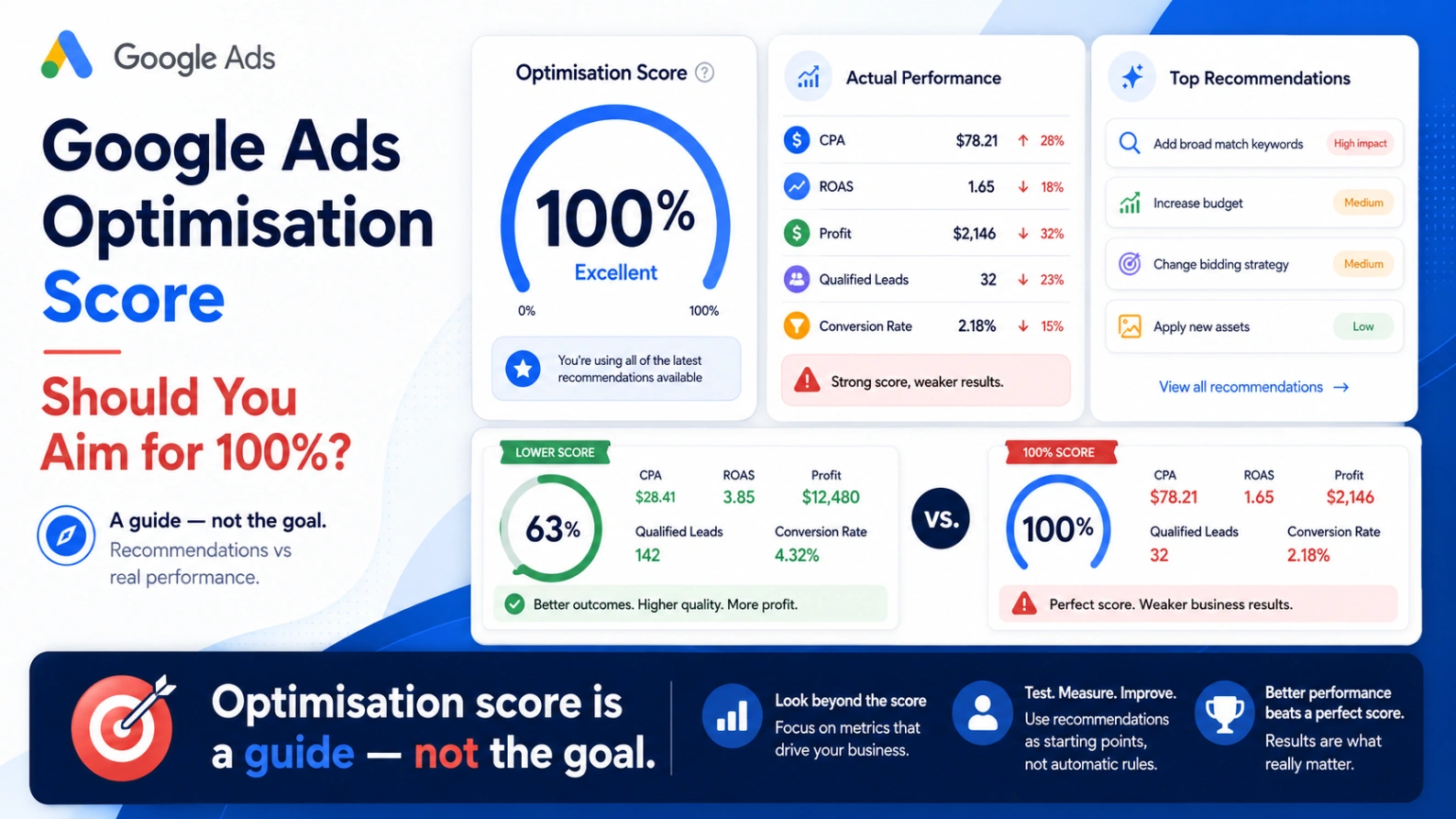
Google Ads Optimisation Score: Should You Aim for 100%?
Your Google Ads account has an optimisation score of 68%.
Google says you could increase it by:
Adding broad match keywords
Changing the bidding strategy
Increasing campaign budgets
Creating additional assets
Applying new audience segments
Adjusting conversion goals
Should you apply everything until the account reaches 100%?
Not necessarily.
Google Ads describes optimisation score as an estimate of how well an account or campaign is configured to perform. It ranges from 0% to 100%, with recommendations showing the potential percentage increase associated with applying or dismissing them. The score is available across several campaign types and can change as account settings, performance data and wider advertising trends change.
The score can highlight useful opportunities, but it is not an independent assessment of:
Profitability
Lead quality
Incremental revenue
Customer lifetime value
Product margin
Tracking accuracy
Business strategy
A campaign can have a high optimisation score and still perform badly.
Another campaign can have a lower score while consistently exceeding its commercial targets.
The right objective is not to achieve 100%. It is to understand each recommendation and apply only the changes that support the business.
What Is Google Ads Optimisation Score?
Google Ads optimisation score is a platform-generated estimate of how effectively an account or campaign is set up to perform.
The score considers factors such as:
Campaign settings
Bidding strategies
Budgets
Keywords
Targeting
Ads and assets
Conversion goals
Historical performance
Search behaviour and trends
Google then produces recommendations that may increase the score.
For example, an account with a 74% score may receive recommendations worth a combined 26 percentage points. Applying or dismissing the recommendations can move the displayed score closer to 100%.
This does not mean Google has identified a guaranteed 26% improvement in revenue, conversions or profit.
The percentage represents the recommendation’s contribution to the optimisation score—not a forecast of equivalent business growth.
Does a 100% Optimisation Score Mean the Account Is Performing Well?
No.
A 100% score generally means the currently available recommendations have been applied or dismissed. It does not prove that the account is:
Profitable
Efficient
Properly tracked
Generating high-quality leads
Acquiring incremental customers
Using the right attribution approach
Allocating budget to the strongest products
Achieving its required CPA or ROAS
Imagine two campaigns.
Campaign A
Optimisation score: 100%
Cost per lead: £150
Qualified lead rate: 5%
Cost per qualified lead: £3,000
Campaign B
Optimisation score: 72%
Cost per lead: £200
Qualified lead rate: 30%
Cost per qualified lead: £667
Campaign A has the higher platform score.
Campaign B creates substantially more commercially valuable leads.
The optimisation score cannot understand this difference unless accurate lead-quality and sales data are being imported into Google Ads.
How Is the Optimisation Score Calculated?
Google does not publish a simple fixed formula.
It states that the score is calculated using account statistics, settings, campaign status, recommendation impact and recent recommendation history. Recommendations are also informed by historical campaign data, Google Ads best practices, search volume and search trends.
That means the score is dynamic.
It may change when:
Campaign performance changes
A new recommendation becomes available
Google updates its recommendation system
Campaign settings are edited
Recommendations are applied or dismissed
Conversion goals change
A campaign becomes eligible for another feature
The score should therefore be treated as a diagnostic input rather than a permanent account-health grade.
Why Google Ads Recommendations Are Not Automatically Right
Google’s recommendations are produced using platform data and predicted opportunities.
Google can see:
Auction behaviour
Search volume
Campaign performance
Bidding data
Account settings
Eligible targeting opportunities
But it may not fully understand:
Gross margin
Product availability
Sales-team capacity
Lead quality
Existing customer demand
Offline cancellations
Return rates
Cash-flow constraints
Brand positioning
Internal business priorities
A recommendation can make sense from the platform’s perspective while being commercially unsuitable.
For example, Google may identify that increasing a budget could generate more conversion value.
That does not automatically mean the additional sales would meet the business’s required margin or profitability target.
Recommendations That Are Often Worth Reviewing
Some recommendations identify genuine technical or structural issues.
Fixing disapproved ads or assets
A disapproved advert, broken destination or policy problem can prevent campaigns from serving correctly.
Adding missing assets
Relevant sitelinks, callouts, images and structured snippets can improve how ads appear and provide users with more useful information.
Repairing tracking issues
Recommendations identifying inactive or incorrectly configured conversion actions deserve attention.
However, tracking should still be tested independently rather than assumed to be correct once the recommendation disappears.
Removing redundant keywords
Duplicate or overlapping keywords can make an account unnecessarily difficult to manage.
Check whether the keywords genuinely serve the same purpose before removing them.
Addressing limited budgets
A budget-limited campaign may represent an opportunity when it is already meeting commercial targets.
The correct response may be to increase budget—but only after checking profitability, impression share, conversion delay and available scale.
Recommendations That Need More Caution
Other recommendations can materially change traffic, spending or bidding behaviour.
Adding broad match keywords
Broad match can help advertisers reach additional searches, particularly when supported by reliable conversion data and Smart Bidding.
It can also expand traffic into less relevant queries.
Before applying the recommendation, review:
Existing search terms
Negative keyword coverage
Conversion quality
Campaign goals
Available budget
Historical broad match performance
A controlled experiment is normally safer than changing every keyword simultaneously.
Changing the bidding strategy
A recommendation may suggest moving to Target CPA, Target ROAS, Maximise Conversions or Maximise Conversion Value.
Before changing, check:
Conversion volume
Conversion accuracy
Current performance
Conversion delay
Budget constraints
Break-even target
Whether conversion values represent revenue or profit
A more automated strategy is not automatically a more suitable strategy.
Increasing budgets
Google may identify that a campaign is losing traffic because of budget.
Increasing budget is logical when the campaign is producing profitable, incremental outcomes.
It is less logical when:
Conversion tracking is unreliable
ROAS is below break-even
Lead quality is poor
Brand traffic dominates results
The campaign is already overspending against business targets
Adding new keywords automatically
New keyword suggestions may expand reach, but they still need to be assessed for intent, relevance and landing-page alignment.
Review the actual proposed keywords rather than applying the entire recommendation group.
Changing conversion goals
This is one of the highest-risk areas.
Primary conversion actions are included in the main Conversions column and can be used by bidding. Secondary actions are normally observation-only and appear in All Conversions.
Making a low-value action primary—such as a page view, form start or button click—can cause automated bidding to optimise towards activity that is easy to generate but commercially weak.
Before accepting a conversion recommendation, confirm exactly which actions the campaign will use.
Optimisation Score vs Actual Performance
The optimisation score measures whether the account aligns with Google’s currently available recommendations.
Actual performance should be assessed using metrics connected to business results.
For ecommerce, this may include:
Revenue
Gross profit
New-customer revenue
Cost of goods sold
Profit on ad spend
Return rate
Customer lifetime value
For lead generation, it may include:
Valid leads
Qualified opportunities
Cost per qualified lead
Sales
Revenue
Margin
Lead-to-sale rate
Platform scores should not replace these commercial measurements.
A recommendation is only useful when it improves a metric that matters.
Should You Dismiss Recommendations?
Yes, when a recommendation is unsuitable.
Google allows recommendations to be applied or dismissed. Applying or dismissing all relevant recommendations can increase the displayed optimisation score. Changes made by applying recommendations appear in the account’s change history.
Dismissal is appropriate when:
The recommendation conflicts with business objectives
It has already been tested unsuccessfully
Tracking is not reliable enough
The account lacks sufficient data
The suggested traffic is irrelevant
Budget cannot support the change
The recommendation would weaken campaign control
The proposed target is commercially unrealistic
Add a clear reason where the interface allows it, and keep an internal record of important decisions.
Recommendations can change or reappear as Google’s systems and account conditions evolve.
Should You Enable Auto-Apply Recommendations?
Auto-apply allows selected recommendation types to be implemented automatically.
Google states that advertisers can choose recommendation categories individually, review what is enabled and see applied recommendations in the Recommendations history and account change history. Google also notes that auto-applying recommendations does not itself increase campaign budgets.
Auto-apply may be suitable for tightly controlled, low-risk maintenance tasks.
It should be used cautiously for changes involving:
Keywords
Match types
Bidding
Target CPA
Target ROAS
Conversion goals
Audience expansion
Campaign structure
Before enabling a category, ask:
Can this change materially increase spend?
Could it alter the quality of traffic?
Could it change what bidding considers a conversion?
Would we normally review this manually?
Can the impact be reversed and measured easily?
For many accounts, manual review remains the safer approach.
Use Change History When Performance Moves
Google Ads change history records account, campaign and ad-group changes from the previous two years. It can show when changes were made, what type of change occurred and which user or system made them. It also maps changes against performance metrics to help assess possible impact.
Review change history when:
Spend suddenly increases
Conversion volume drops
CPA rises
ROAS declines
New traffic appears
Conversion goals change
Budgets move unexpectedly
A bidding strategy enters learning
An automated recommendation may have been applied
Filter for:
Budget changes
Bid-strategy changes
Keyword changes
Conversion changes
Auto-applied recommendations
Google Ads API changes
Individual users
This often reveals that a performance change began shortly after a significant account edit.
Correlation does not automatically prove causation, but it provides a useful starting point.
A Better Way to Review Recommendations
Use the following process rather than applying recommendations solely for score uplift.
1. Identify the recommendation
Record exactly what Google wants to change.
2. Understand the predicted benefit
Is the recommendation intended to improve:
Reach
Conversion volume
Conversion value
Ad coverage
Tracking
Budget utilisation?
3. Check the commercial objective
Confirm whether the business wants:
More revenue
More profit
Lower CPA
Better lead quality
More new customers
Greater market share
4. Validate the data
Check that the conversion actions and values supporting the recommendation are correct.
5. Estimate the risk
Consider whether the change could increase spend, reduce control or alter traffic quality.
6. Review historical evidence
Check whether the recommendation—or a similar change—has previously been tested.
7. Test where possible
Google Ads experiments allow advertisers to compare changes with an original campaign before deciding whether to apply them more widely.
8. Measure business outcomes
Do not judge the test using optimisation score alone.
Assess CPA, ROAS, profit, qualified leads, customer acquisition and other relevant results.
What Optimisation Score Should You Aim For?
There is no universal ideal score.
A healthy account may sit below 100% because the advertiser has intentionally rejected recommendations that do not suit its objectives.
A more useful standard is:
Every recommendation has been reviewed
Important technical problems have been fixed
Unsuitable recommendations have been dismissed
Material changes have been tested
Conversion tracking reflects real outcomes
Budgets align with commercial performance
Decisions are documented
An account at 82% with clear reasoning may be better managed than an account at 100% where every recommendation was accepted without scrutiny.
Google Ads Optimisation Score Audit Checklist
Review these areas:
Conversion goals
Which actions are primary?
Which actions are secondary?
What is bidding optimising towards?
Are values accurate?
Are duplicate conversions present?
Recommendations
Which recommendations remain open?
What score uplift is attached?
Which have been dismissed?
Which have been applied previously?
Auto-apply settings
Which recommendation groups are enabled?
Who enabled them?
What changes have been applied?
Change history
Did performance move after a recommendation?
Were targets, budgets or keywords changed?
Did an external tool make changes?
Commercial alignment
Would the recommendation improve profit?
Does it support customer acquisition?
Is there enough budget and sales capacity?
Does it match the company’s priorities?
Testing
Can the recommendation be tested through an experiment?
Is there a clear baseline?
What determines success or failure?
When a Low Optimisation Score Is a Warning
A low score should not be ignored automatically.
It may indicate:
Disapproved ads
Missing conversion tracking
Inactive campaigns
Limited budgets
Poor asset coverage
Outdated settings
Campaigns not using available features
The correct response is to investigate the underlying recommendations.
Do not assume the low score itself is the problem.
Final Thoughts
Google Ads optimisation score is useful when treated as a list of potential areas to review.
It becomes dangerous when treated as a target that must reach 100%.
The strongest process is:
Review each recommendation.
Validate the underlying data.
Compare it with business objectives.
Estimate the risk.
Test material changes.
Measure commercial outcomes.
The platform can identify opportunities using account and auction data.
Your business must decide whether those opportunities are relevant, profitable and strategically appropriate.
GoogleAdsAudits.com provides an independent, read-only audit covering wasted spend, search terms, bidding, campaign structure, tracking and growth opportunities rather than relying on a single platform-generated score.
Find out whether your Google Ads recommendations will genuinely improve performance—or simply increase the number displayed at the top of the Recommendations page.
Frequently Asked Questions
What is a good Google Ads optimisation score?
There is no universal ideal. The score should be reviewed alongside profitability, CPA, ROAS, lead quality and business objectives.
Should I aim for a 100% optimisation score?
Not automatically. A 100% score can be achieved by applying or dismissing recommendations, but it does not guarantee strong commercial performance.
Does dismissing recommendations reduce performance?
Not necessarily. Dismiss recommendations that conflict with your objectives or lack sufficient evidence.
Can Google Ads apply recommendations automatically?
Yes. Advertisers can enable selected auto-apply recommendation categories and review applied changes in the Recommendations history and change history.
Does optimisation score affect ad rank?
Google presents optimisation score as an estimate of account or campaign configuration and potential. It should not be treated as a direct measure of ad rank.
Should I accept broad match recommendations?
Review search-term relevance, conversion quality, negative keywords, bidding and budget first. Test broader matching in a controlled campaign or experiment where possible.
Can a low-score campaign still perform well?
Yes. A campaign may achieve strong CPA, ROAS or profit while rejecting recommendations that do not match its strategy.
How often should recommendations be reviewed?
Review them regularly and after major tracking, bidding, website or business changes. Google notes that recommendations and their impact can change over time.
AUTHOR BIO
Jack Felstead is an award-winning Paid Media, AI and Digital Growth Consultant with 17 years of experience helping businesses improve customer acquisition, revenue, advertising efficiency and profit.