How to Audit Your Google Ads Conversion Tracking
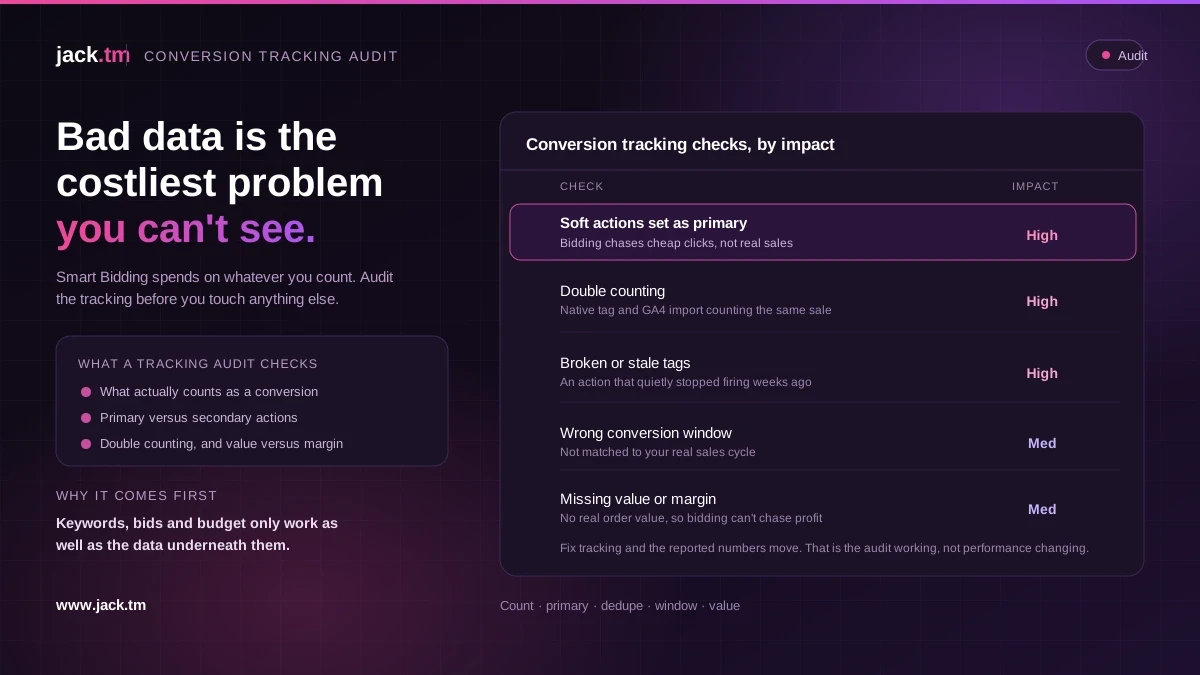
Bad tracking is the most expensive problem in a Google Ads account, because it is invisible. The campaigns look fine. The reports look fine. The bidding is quietly learning from numbers that are wrong.
Smart Bidding does exactly what the data tells it to. Feed it inflated conversions and it spends more to win sales that were never real. Feed it half the conversions and it starves the campaigns that actually work. Either way, you lose money and the dashboard never shows it.
So before you audit keywords, bids or structure, audit the tracking. If the numbers are wrong, every other decision is built on sand. Here is the check, in the order that matters.
Start with what is actually being counted
Open Goals, then Conversions, and read every conversion action one by one. Not the summary. The actual list.
For each one, ask a simple question: does this represent real commercial value? A purchase does. A booked call does. A newsletter sign-up, a page view, a button click, a PDF download, these usually do not, and if they are set to count and marked as primary, they are polluting the data bidding runs on.
You are looking for three things here. Conversion actions that should not count at all. Soft actions dressed up as sales. And old actions left running from a setup two agencies ago. Any of these quietly inflates the numbers and pulls spend towards the wrong goal.
Check primary versus secondary
This is the setting most accounts get wrong. Only primary conversion actions feed bidding. Secondary ones sit in reporting and do not affect how the system spends.
A healthy account has one clear primary action per campaign goal, usually the sale or the qualified lead. Everything softer sits as secondary, useful to see, kept out of the bidding.
If you find five primary actions, three of which are micro conversions, that is your first fix. Demote the soft ones to secondary. You will often see the cost per real conversion jump overnight in the reports, not because performance dropped, but because you are finally measuring the right thing.
Look for double counting
Double counting is common and it flatters every number in the account. The usual causes are a conversion tag firing twice on one page, the same purchase counted through both Google Ads and Google Analytics imports, or "every" set as the count when it should be "one".
Three quick checks. For lead gen, count should almost always be "one" per click, not "every". For ecommerce, "every" is right for purchases, but make sure you are not also importing the same transaction from GA4 on top of the native tag. And use Google Tag Assistant or the browser network tab to watch a test conversion fire. If one action sends two events, you have found money.
A account that double counts looks like it is performing twice as well as it is. Bidding believes it, and overspends to match.
Audit the conversion window and attribution
Two settings here change the shape of all your data.
The conversion window decides how long after a click a conversion still counts. Too short and you undercount considered purchases. Too long and you credit clicks that had little to do with the sale. Match it to your real sales cycle, not the default.
The attribution model decides how credit is split across the path. Data-driven is the sensible default for most accounts now, but if the model was changed mid-period, your before and after numbers are not comparable. Note any model change and exclude those windows from trend reporting.
Check that tags actually fire, and fire fresh
A tag that stopped working three weeks ago will not announce itself. The conversions just quietly fall to zero on that action while the rest carry on.
Look at the status column in the conversion actions list. "No recent conversions" on an action that should be firing daily is a red flag. "Tag inactive" is an emergency. Then check the dates: if conversions lag by days, you may be relying on a pixel that misses a large share of events to ad blockers, iOS and cookie limits, which is the case for sending conversions server-side instead.
Check the value, not just the count
Counting conversions is the floor. For ecommerce, bidding to profit needs real value in the feed.
Confirm that purchase value is being passed, that it matches the real order value, and that it is not a static placeholder like "1" or an average applied to every sale. Then go one step further: the revenue in the feed is not the same as profit. If every product carries the same assumed margin, bidding will chase high-revenue, low-margin lines. Feeding real margin back in is what turns a tracking fix into a profit gain.
Then tie it back to bidding
The point of the audit is not a tidy conversion list. It is better decisions.
Once the tracking is clean, the data Smart Bidding learns from is finally honest, and the system can do its job. Expect the reported numbers to move when you fix tracking. That is the audit working, not performance changing. The account was always this profitable or this wasteful; you just could not see it before.
Clean tracking first. Everything downstream, keywords, bids, budget, structure, only works as well as the data underneath it.
FAQs
How often should I audit Google Ads conversion tracking? Fully, once a quarter, and after any website change, replatform or tag deployment. A broken tag after a site update is one of the most common causes of a sudden, unexplained drop.
What is the most common conversion tracking mistake? Counting soft actions as primary. Newsletter sign-ups or page views set as primary pull bidding towards cheap, low-value actions and away from sales.
Does fixing conversion tracking lower my performance? No, it corrects what you were measuring. The reported numbers often change, sometimes a lot, but the real profit was always whatever it was. You are now seeing it accurately.
Should I use the native Google Ads tag or import from GA4? Pick one source of truth per action so you do not double count. Many accounts run both by accident and inflate every number.
Is server-side tracking worth it? If ad blockers, iOS and cookie limits are costing you conversions, yes. A server-side feed recovers events the browser pixel loses, which gives bidding more complete data to work from.